

Introduction
As a digital marketing professional with years of experience helping businesses grow online, I’ve seen one common truth—your website is your most powerful sales tool. If you’re wondering how to design a website that attracts more customers, the answer lies in combining smart strategy with user-focused design. A website should not just look good—it must build trust, deliver value, and guide visitors toward action.
Why Website Design Directly Impacts Customer Growth
In my experience, clients who invest in professional design see higher conversion rates and stronger customer engagement. A poorly designed website can drive visitors away, while a strategic design captures attention and builds credibility. Learning how to design a website that attracts more customers is not just about aesthetics—it’s about creating a digital journey that converts.
Proven Strategies: How to Design a Website That Attracts More Customers
1. Focus on User-Friendly Navigation
One of the first lessons I share with clients is the importance of easy navigation. Visitors should find what they’re looking for within seconds. When navigation is seamless, customers naturally stay longer and interact more.
2.Design for Mobile First: Why It’s Essential to Attract More Customers

When I consult businesses on how to design a website that attracts more customers, one of the first strategies I emphasize is mobile-first design. Today, more than 60% of global web traffic comes from smartphones, and Google itself prioritizes mobile-friendly websites in search rankings. If your website isn’t optimized for mobile, you’re not just losing visitors—you’re losing potential customers.
Why Mobile-First Matters
- User Behavior: Customers are no longer tied to desktops. They search, browse, and buy directly from their phones. If your website doesn’t adapt to small screens, users leave within seconds.
- SEO Advantage: Google’s mobile-first indexing means your mobile version is the primary factor in ranking. A mobile-friendly design increases visibility, bringing more customers to your site.
- Customer Trust: A professional, responsive design signals credibility. If your website looks broken or hard to navigate on mobile, customers may doubt your professionalism.
Core Principles of Mobile-First Design
Responsive Layouts
Use flexible grids and images that automatically adjust to different screen sizes. A mobile user should never have to zoom or scroll sideways to read content.Simplified Navigation
Mobile screens are smaller, so menus should be short, clear, and thumb-friendly. Hamburger menus, sticky headers, and large clickable buttons are effective solutions.Optimized Speed
Mobile users expect instant results. Compress images, use lightweight code, and enable caching to make sure your site loads in under 3 seconds.Readable Content
Keep paragraphs short, use legible fonts, and ensure text contrasts well against the background.Touch-Friendly Design
Buttons, forms, and CTAs must be large enough for fingers to tap easily. A poorly placed or tiny button can mean losing a customer.
My Experience with Mobile-First Projects
I’ve worked with clients where shifting to a mobile-first approach transformed their business. For one e-commerce client, redesigning their site for mobile boosted conversion rates by 45% in three months. Customers found it easier to browse products, add to cart, and checkout—all from their phones.
How Mobile-First Attracts More Customers
By focusing on mobile-first design, you:
Keep visitors engaged longer.
Provide a smooth buying journey on all devices.
Improve search engine ranking.
Build trust and authority in your industry.
3. Prioritize Loading Speed to Attract More Customers

In my years of digital marketing experience, I’ve noticed one major factor that can make or break a website’s performance: loading speed. Customers today expect instant access to information. If your website takes more than a few seconds to load, they will simply leave and choose a competitor. When considering how to design a website that attracts more customers, optimizing speed must be a top priority.
Why Website Loading Speed Matters
User Experience (UX): Studies show that a delay of just 1 second in page load time can reduce customer satisfaction by 16%. Fast websites feel professional, trustworthy, and user-friendly.
SEO Rankings: Google uses page speed as a ranking factor. A slow website won’t just frustrate customers—it will also rank lower in search results, costing you valuable traffic.
Conversions & Sales: My experience with e-commerce clients has proven this clearly: when load times were reduced from 5 seconds to under 2 seconds, conversions jumped by up to 40%.
How to Improve Website Loading Speed
1. Optimize Images and Media
Large, uncompressed images are one of the most common reasons for slow websites. Always:
- Use modern formats like WebP.
- Compress images without losing quality.
- Add proper dimensions for faster rendering
2. Minify Code (HTML, CSS, JavaScript)
Every unnecessary line of code adds extra load time. Minifying and combining files makes websites lighter and quicker.
3. Enable Browser Caching
Caching allows returning visitors to load your website almost instantly by storing key files in their browser.
4. Use a Content Delivery Network (CDN)
A CDN distributes your website across multiple servers worldwide, ensuring faster access no matter where your customer is located.
5. Choose Reliable Hosting
From my experience, many businesses lose customers simply because of cheap, shared hosting. Investing in a high-quality hosting provider significantly improves speed and uptime.
6. Limit Plugins and Scripts
While plugins add functionality, too many slow down a site. Only use what’s necessary and keep them updated.
My Experience with Speed Optimization
I worked with a service-based client whose website took 7 seconds to load. After optimizing images, switching to a better host, and implementing caching, we reduced load time to 1.9 seconds. The result? Bounce rate dropped by 35%, and customer inquiries nearly doubled within three months.
How Loading Speed Attracts More Customers
Faster access keeps visitors engaged and reduces bounce rate.
Higher Google rankings bring more organic traffic.
Better user experience leads to more conversions.
Trust & professionalism improve brand perception.
4.Create SEO-Friendly Content to Attract More Customers
As someone experienced in digital marketing, I’ve seen time and again that even the most beautifully designed websites fail if the content isn’t optimized for search engines and users. When it comes to learning how to design a website that attracts more customers, SEO-friendly content is the backbone. It helps your website rank higher, get discovered by the right audience, and most importantly, convert visitors into loyal customers.
Why SEO-Friendly Content Matters
Search Visibility: If your content is not optimized, your target audience won’t find you. SEO-friendly content ensures your website ranks for the keywords customers are actively searching.
User Engagement: Content that’s easy to read, relevant, and valuable keeps visitors engaged and increases time spent on your site—key signals for Google.
Conversions: When your content speaks directly to customer pain points and provides solutions, it turns clicks into conversions.
Core Principles of SEO-Friendly Content
1. Keyword Research & Placement
From my experience, everything starts with keyword intent. You must know what your audience is searching for. For example, someone searching how to design a website that attracts more customers is looking for actionable guidance, not just theory.
- Place keywords in titles, subheadings, intro sentences, meta tags, and image alt text.
Maintain natural flow—never stuff keywords.
2. Engaging and Valuable Content
SEO is not just about pleasing algorithms—it’s about satisfying people. Content must solve a problem or answer a question. Customers should leave your site feeling that your expertise provided real value.
3. Content Structure & Readability
I always recommend using H1, H2, H3 headings, bullet points, and short paragraphs. This makes content easier to scan and improves SEO signals.
4. Optimized Media (Images, Videos, Infographics)
Visuals break up text and improve engagement. But for SEO, always optimize by:
- Adding descriptive alt text with keywords.
- Compressing files for faster loading.
- Using videos for better dwell time
5. Internal & External Linking
Smart linking builds authority. I guide clients to link internally to other pages on their site (e.g., services, blog posts) and externally to reputable sources. This shows both users and search engines that your content is trustworthy
6. Strong Calls-to-Action (CTAs)
SEO brings traffic, but CTAs turn visitors into leads. Phrases like “Get a Free Quote,” “Start Your Project,” or “Contact Our Team” guide customers toward action.
My Experience with SEO-Friendly Content
One of my clients in the digital services niche saw organic traffic grow by 120% in six months after we redesigned their site with optimized, customer-focused content. Not only did they attract more visitors, but their conversion rate doubled, because the content was aligned with both SEO strategy and customer intent.
How SEO-Friendly Content Attracts More Customers
Improves Google rankings → More visibility.
Increases website engagement → Visitors stay longer.
Builds brand authority → Customers trust you more.
Drives conversions → Visitors become paying clients.
5. Strong Branding and Visual Impact
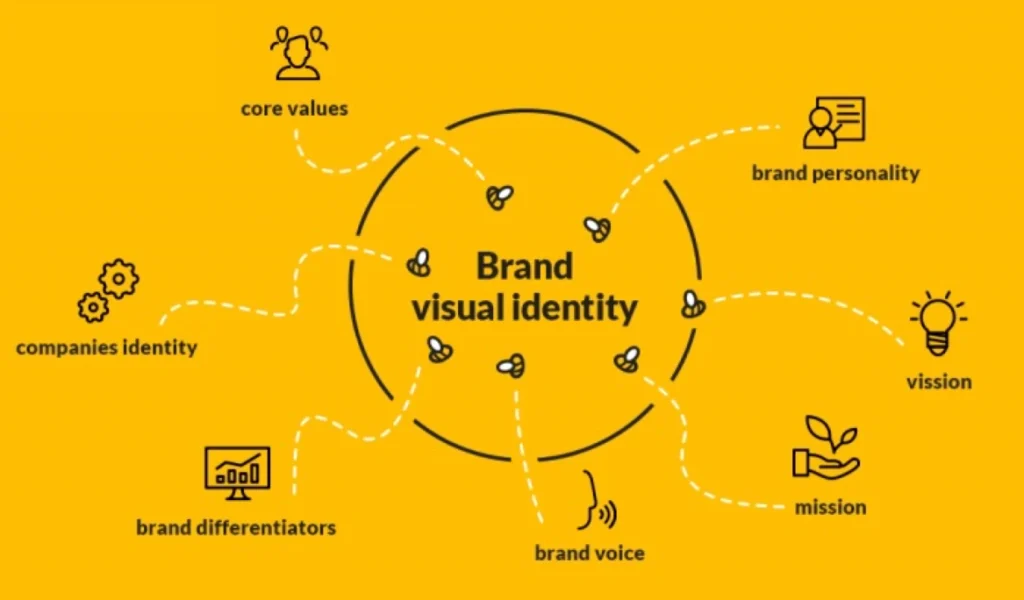
Colors, typography, and visuals are more than design—they tell your brand story. A consistent brand identity ensures customers remember you, trust you, and choose you over competitors.